
Start AI check
Open Terminology → Glossaries and select the desired glossary.
Click AI features → AI-assisted clean-up.
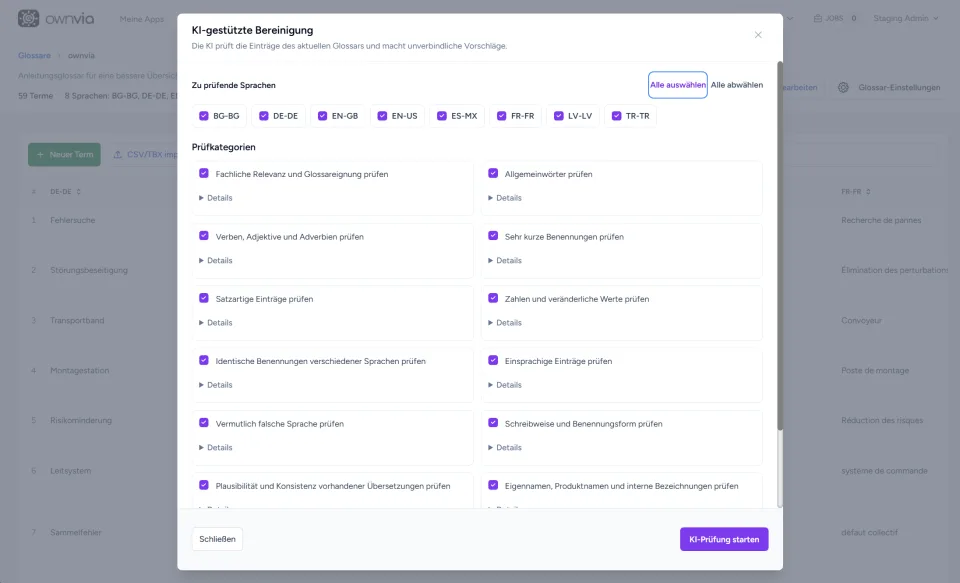
Select the languages and check categories to be taken into account.
Check the displayed activation costs.
Click Start AI check.
ownvia analyses the selected glossary content for potential irregularities, such as spelling, terminology or the consistency of existing translations.
Review results and apply suggestions
Once the analysis is complete, ownvia displays detected irregularities along with explanations and possible change suggestions.
You can review and apply suggestions individually or apply multiple suggestions in one go.
Important: The AI review does not automatically change your glossary. Only when you apply a suggestion is the relevant change saved directly.
Caution: When applied, suggestions labelled “Exclude” remove the complete terminology entry, including all language versions. Therefore, check these suggestions particularly carefully.
How much does the AI review cost?
For every started block of 50 glossary entries reviewed, an activation is charged. A multilingual terminology entry counts only once.
The estimated costs are displayed before starting.
Note: AI-generated suggestions may contain errors. In particular, technically relevant or safety-critical terms should be checked before being applied.