
1. Create glossaries by subject area
Create a separate glossary for each subject area, for example:
Mechanical engineering
Electrical engineering
Medicine
Law
This keeps specialist terms, translations and linguistic nuances clearly separated.
2. Maintain specialist terminology
Add the relevant specialist terms and their translations to each glossary.
You can import existing terminology or expand and review it using ownvia's AI features.
3. Link glossaries to translation templates
Open Translate and select the desired translation template.
Open the template settings.
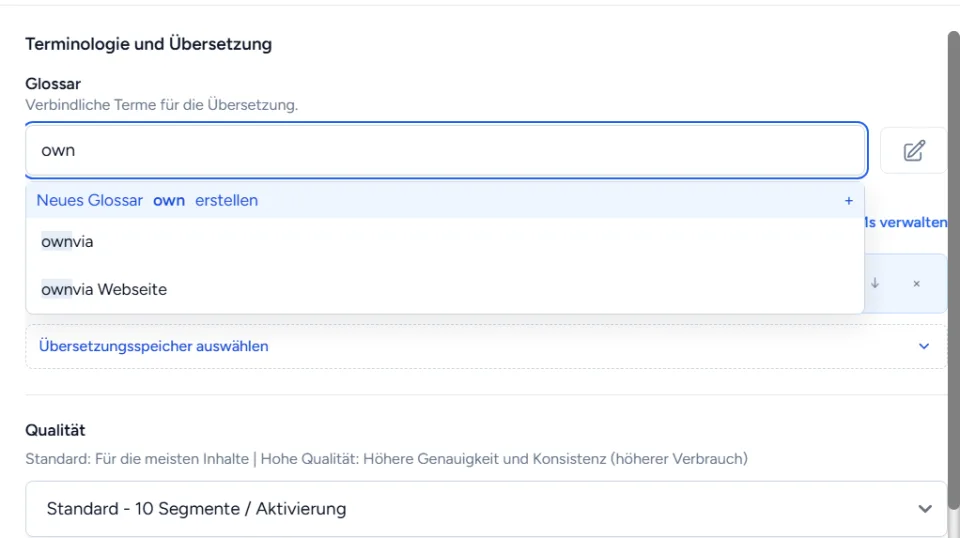
Under Terminology and translation → Glossary, select the appropriate subject glossary.
Save the settings.
ownvia will then take the terminology of the assigned glossary into account for AI translations using this template.
Why are separate glossaries useful?
A term can have different meanings depending on the subject area. For example, “Lager” is translated as “bearing” in mechanical engineering and as “warehouse” in logistics.
By separating glossaries by subject area and assigning them to translation templates, ownvia can take the appropriate specialist terminology into account.